Pinterest is the next hottest startup that lets you organize and share all the beautiful things you find on the web . Its the most talked social network that everybody and their cat has being talking about of recent. It is basically an image sharing site where users “pin” images to “boards” (also called as Pin-Boards). If you are bored with how Images and other stuff appear on FB timeline , then we have a way out for you. You can view and use Facebook as you would see images on Pinterest .
Well, now there is an app that does that 😀 !
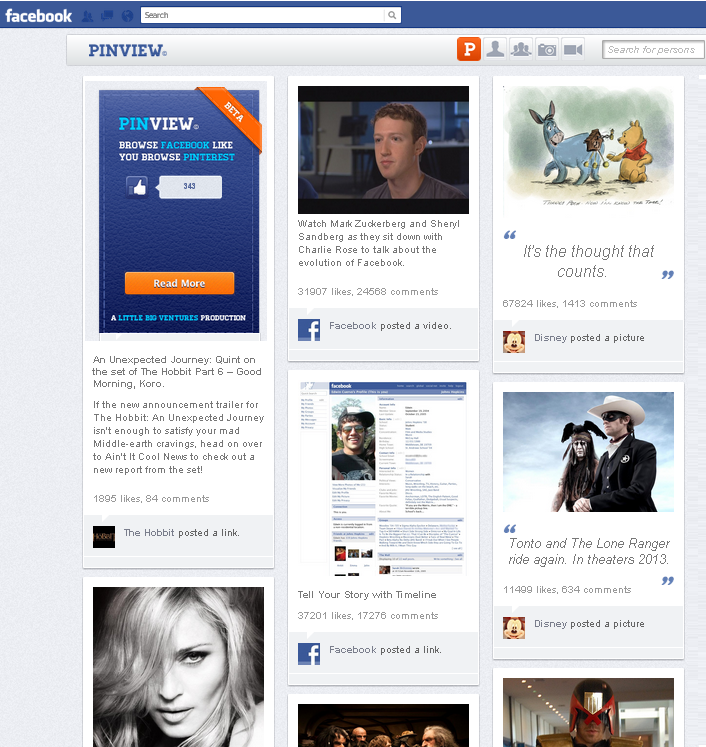
PinView is a FB app which displays items from your News Feed, Timeline, friends list and multimedia pages as small panels, just like your social bookmarking site Pinterest showcases images on Pinboards. Once you get that app, PinView opens up your News Feed in grid format. Buttons at the top of the page, right hand side, allow you choose to view stuff from your Timeline, friends’ profile photos, photos or videos.
How To Get Pin View .
Step 1: Navigate to https://apps.facebook.com/pinviewer/

Step 2: Click On ‘Go to App ‘.
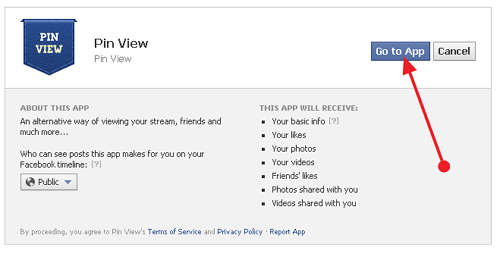
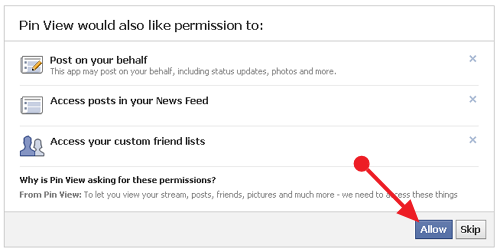
Step3: Accept the Facebook authorization prompts.
Your Facebook NewsField will then load in a gorgeous streamline layout that will remind you of Pinterest .
You can view your Timeline, pictures, videos and friends.
Final Thoughts
This can be the best app which helps to make Facebook easier to use , and I recommend it wholeheartedly.
Do you like pinview ? Please share your opinions on comments 🙂
OMG, this one is just the coolest App I have seen so far. Installing it right now, my friends would go crazy about it when I share it with them.
Never heard of this app must i MUST HAVE IT, i´ll make all my friends jealous…..thanks
This is the best looking app for Facebook I have ever seen! Now everything looks so good on my wall. Thanks for sharing!
I was fedup with timeline however this apps inspires me a lot. thanks for sharing it with me. keep up the right and great work.
I had not heard of this app but it sounds really neat! I will have to get it a shot. I’m not too fond of the timeline like many people I know, so this would make an interested switch. Thanks for sharing!
Wow! I had never heard of this app before either. There are so many great advances happening with Facebook. My favorite is Facebook Insights which allows you to track fan interaction with your page. This way you can gauge the interest of your population with what you are posting and sharing.
I used Facebook and pinterest both . It will be interesting to use the combinations of both. Thanks for information provided.
I couldn’t believe it when Facebook made me switch to the timeline view. This will let me make sense of my world again. Thanks!
this app is really interesting, and very innovative too . will definitely try out soon . thanks for the share
wow its really beautiful. I love pinterest. now I am able to see it with facebook. Thanks for sharing.
This seems to be pretty cool idea
will try out and tell you the feedback soon 🙂
Hi what a great breakthrough this is going to make combining everything so simple. Not to say saving a stack of time. I haven’t been able to do much on Pinterest through lack of time.
Great post thanks lee
Hi,
I used Facebook and pinterest both . It will be interesting to use the combinations of both.This is really great post and very helpful for us.
Thanks for the sharing.
Hi,
Thank you for sharing this one mate. It is really an eye opener.I’d never hear before about this app,its look really amazing.and i am going to use this app on my facebook profile.
Thanks!
Hmm, very interesting stuff here, i did not know it was possible to do this., thanks for sharing.
Pinview really seems like an interesting app..Will check it out for sure..Thanks for sharing this info..
Wow! Technology is really evolving. Who would have thought this can happen! Thanks for sharing this eye opening revelation.
Regards
Dickens