Windows 8 is almost upon us and the recent Consumer Preview showed it’s very different to what’s gone before . I have already had a chance to try out the developer and consumer preview editions . Here are some cool tips and tricks you need to know to jump right in and get started with Windows 8.
1. Choose Picture Password
Windows 8 allows you to create a picture password, where you choose an image, then draw on it in a combination of taps, lines and circles .This seems a more secure way which cannot be cracked by hackers and only someone who can reproduce this pattern will be able to log on.
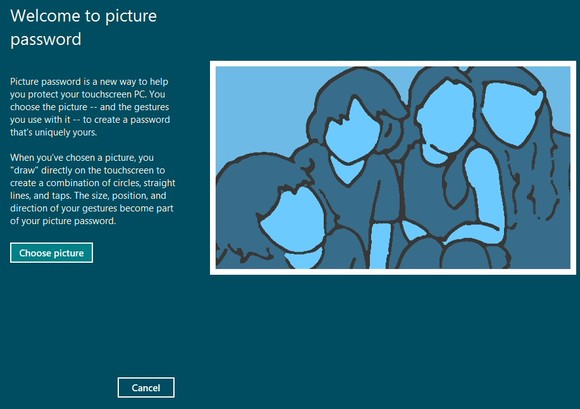
Select Win + I > More PC Settings > Users > Create a Picture Password to give this a try.
2. Auto Login
Of course even if you remove the lock screen, you will still be forced to manually log in every time your system starts. This can be resolved at speed, though, using much the same technique as in previous versions of Windows.
Hold down the Windows key, press R.
Type netplwiz and press Enter to launch the User Accounts dialog.
Clear the “Users must enter a user name and password to use this computer” box and click OK.
Enter the user name and password of the account that you’d like to be logged in automatically, click OK, restart your system and this time it should boot directly to the Start screen.
3. App Store
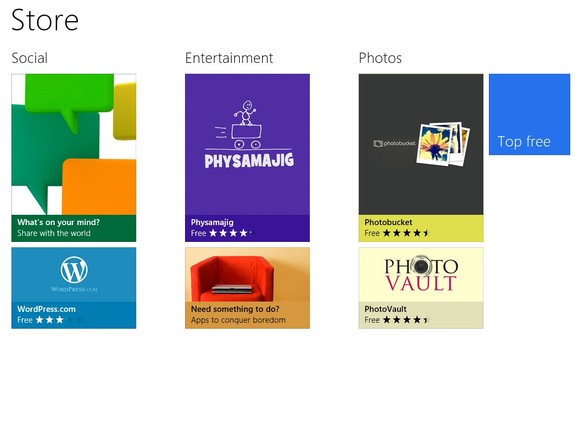
Along with the built-in apps , there’s the hyped Windows 8 Store which provides games, video and music apps, photo tools and more. Lots pf popular apps are already made available like Evernote , Vimeo , WordPress , USA Todayand many more .
4. Task Manager and Management System
Ctrl-Alt-Del is still around in Windows 8 and it opens Task manager where you can switch users, lock the workstation or log out. Want to check out Windows 8’s new task management system ? Just click on the link near the bottom of the window to bring it up!
Just need Task Manager? Ctrl-Shift-Esc is a fast, convenient way to get there.
5. Customize the Home Screen
The Metro interface is designed to look like a “tablet” style screen. If there’s an app you use all the time then you don’t have to access it via the search system, of course. Pin it to the Start screen and it will be available at a click. You can easily pin and un-pin apps you don’t want with a right-click of your mouse if you have no touch screen to “down swipe.”
6. Just Type It !
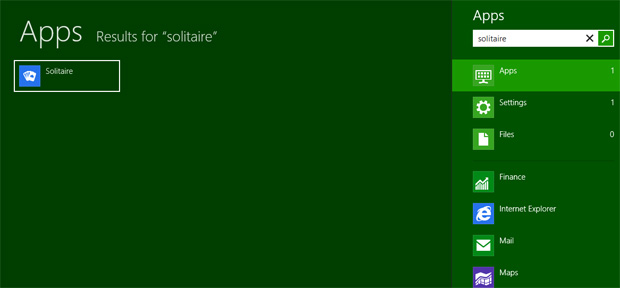
Can’t find a certain app? Just begin typing at the home screen and app-related search results will pop right up.
7. Uninstall Apps Super-fast
Looking for a fast way to eradicate any Windows or third-party apps that you have installed on Windows 8 ? Just right-click on the icon within Windows Metro UI and select “Uninstall and you will see them disappear in a jiffy. Poof!
8. Against Disaster mode
Windows 8 makes it easy to return a broken operating system to default mode unlike its previous versions and saves the efforts to re-install . Click on the General tab within the aforementioned “More PC Settings” menu.
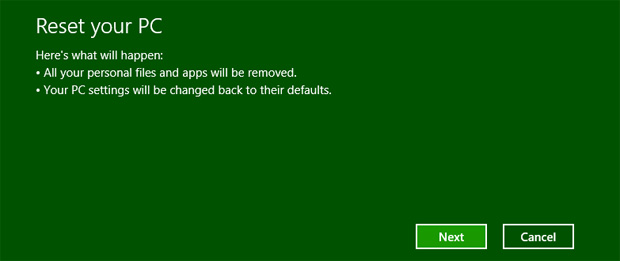
- The “Refresh” option cleans your system of the third-party apps you have installed and returns it to factory-default settings, but it keeps your User files.
- The “Reset” option wipes your operating system clean of all your data and returns your system to Windows 8’s factory-default settings.
9. Mount ISO files in Windows 8
At long last, Windows 8 will allow you to mount and unmount ISO and VHD files — if only it let you create them, too . Need to take a closer look at an ISO file? Right-click it in Explorer, click Mount and you can view it as a virtual drive, launch the files it contains, or add more if you like.
10. Dark Horse IE 10
IE 10 is a sort of curious beast. There are two versions of this app –
- A Metro-style constrained app providing a full-screen browsing experience that will work wonders on tablets .
- The other one is a traditional desktop application that looks and works much like its predecessor IE 9 and is fully extensible with third-party add-ons.
IE 10 Metro is the default .
Thanks for this post, it looks promising…like a good slap for mac lovers 🙂 hope it will work better than win7.
Picture password is really interesting to know but I think, it is also difficult to remember picture password your ownselves.
Hi, Pete Goumas
No it is not it is quiet easy to insert picture password and remember it. You may just remember your
picture where you click. My friend use windows 8 it is nice…
Thank you…
Agree with you . Yeah i think its more complicated for me because i have this problem regarding picture image. Its better for me if I will use word or number as my password.
For me, “Just Type It” is one of the better reasons to go for this Windows. Does this search in online App Stores as well?
I read they really put a big focus on design for the Metro Interface. Apple products look more flashy and appealing for the younger crowd, but Microsoft seemed a bit dated. This should help put them on the radar of 20 something consumers.
Looks great but given the history (bad one that is) when they released Vista, people shouldn’t jump on the hype right away. Me, I’ll wait for the feedback and reviews first before trying it out.
Thanks for sharing such a valuable information. It’s really amazing.
nice sharing it is Thanks for again sharing great
Great
“Just type it” and Password picture are very interesting in this window. Can’t wait to change my
windows 7 to 8.
I’ll be really impressed if it can get rid of Internet Explorer in a flash, lol.
Metro interface is just awesome! I like it and I already got used to it from Xbox360 dashboard, but as you said it, I’m waiting for reviews and feedback from friends before actually buying it.
Window 8 seems to be loaded with lots of features and picture password is its one of the very exciting feature indeed. I am very excited for the release of its full and final version.
This Windows 8 looks very interesting, but i’m running with Ubuntu and i really prefer this. Who knows, with the future reviews i will change my point of view !
Window 8 brings users a lot of useful and unique features. Hope there is not so many errors like the Window 7.
I’m still extremely on the fence about Windows 8. Hated Vista, loved 7. So iffy about 8 for work tasks.
Fantastic pics to upgrade our PC’s. picture password is interesting and very useful. thanks for sharing it with me.
Piture password can be a very good way to do pictures. I would love to have it in my pc. And I think it is time for me to do the upgrade to the Windows 8.
I have to say that Windows is making strides here. Anything to stop the avalanche of people switching to Mac. When will they learn that shiny cases does not equal computing power?
It’s about time Windows gave us the ability to further customize our screens without going to third party software or other mods. I am of the belief that it’s my desktop; let me dress it up how I want! Motivating article; i’m excited for windows 8.
sounds like i am boring but i prefer to wait a bit and see what the feedback and reviews are before trying it out…sorry
I agree, I’d rather wait and see what glitches appear first.
I don’t know how I feel about Windows 8. Hated Vista. Love 7. Don’t know about 8. Hmmm… :/
Sounds great. I think using picture as password is really effective. Hackers will try so hard to open your account.
That’s nice, till now i am using Windows 7, but after reading this i was just like , missing something.
I have downloaded a fresh copy of windows 8 preview, if i stuck could you help me ?
Very useful post. People often buy new products, pieces of technology without researching them so to have information like this is great. Agree with Gareth though, after some of the mistakes and poor editions of Windows, i think it is wise to wait a bit before buying Windows 8, even if the picture password is a nice addition!
Windows 8 looks very interesting. I’m intrigued by the picture password, but a series of circles, lines, taps, etc. sounds much more difficult to remember than a normal password. And a ton of people already have a horrible time remembering a normal password, let alone one made up of “gestures”.
Windows8 is quite good but i like to use windowsXP operating system.Because anyone can easily handle Xp operating as it is very to operate.Moreover it’s look simple but i feel comfortable with this.
as long as there wont be too many errors as in windows7 i´ll be happy, actually, i´m quite excited about Window 8, picture password is gonna be good
Picture password is really an awesome idea. That way hackers won’t get through easily. I love the features of windows 8. Thank you for sharing.
Against disaster mode – that is one of the coolest feature in window 8. I always use deepfreeze on my system files so nothing gets changed when a virus is trying to attack any file from it.
I don’t yet belive in windows 8. I barely got myself used to 7. I am starting to enjoy it’s benefits.
Thanks for the information. I have held off from upgrading to Windows 8, waiting to see if any errors would become apparent. Does loom like a good product on the basis of this though.
Microsoft Windows 8 features are good when we read the reviews BUT I read somewhere before about the history of Microsoft Windows client Operating Systems.
They are saying Bad and Good are recurring and now with Windows 8, it is time for bad 😀
Check this friends
Windows 95 – Bad
Windows 98 – Good
Windows Me – Bad
Windows XP – Good
Windows Vista – Bad
WIndows 7 – Good
Windows 8 – ????
Time will tell us the truth.
Thanks.
WoW, this is the first time that windows 8 will take over from apple. looks like a promising one.
Windows 8 is really amazing. I like the metro interface.
I think they are enough 😛
Windows 8 is really very attractive and exciting. I downloaded the preview of windows 8 and its just awesome
If everybody is so happy with it I am gonna try it!
Hi these upgrades they are putting in windows 8 from 7 look really impressive. Let’s face it though they needed it windows has been being left behind by apple recently. I think this will help them but it still won’t make me change from apple.
Thanks lee
I’ve been using Windows 8 and I have nothing bad to say about it. And I am really enjoying the picture password.
I have already upgraded. Windows 8 is ok to use, although I will hardly be using the Modern UI – it just doesn’t meet my needs, and I prefer open distribution policies.
Before upgrading though, remember to backup Windows, even though an in-place upgrade exists.
With windows 8 metro, i no longer need my dock, and all of the major selling points of Start are still there. My mom and myself knew what was going on within 5 minutes, some learning curve mate. People just hate anytime something changes, better or worse people grab their pitchforks, get over it, learn it, it is easy enough I could probably train my dog to use it.
Wow Windows 8 is awesome. Currently I am using Windows 7 Ultimate edition in my system. Now I just want to update it in Windows 8 and start experiencing it. Thanks for sharing the post.
Hi
I left a comment about how I love apple and have thought Microsoft were getting left behind. I have been using windows 8 quite a bit since and will admit it is a huge jump forward and is combating apple really strongly. Just thought I would share that.
Thanks again lee
i love the picture password idea but in the other side i see it will be too hard to remember this password every time
The app store and mounting .iso files is the only improvement compared to Windows 7. Unfortunately it’s not enough for me to upgrade.
I have very limited technical skills. “Technically impaired” is the word I use to describe myself.
I have been using a laptop with windows 8 for the last 4 months without facing any troubles whatsoever and am totally loving it!
A friend of mine who bought a new pc last week opted to buy an outdated model just because he did not want to go for a system that runs on Windows 8.
Let me reassure you that most of the fears and doubts regarding it are misplaced. And its an extremely user friendly platform which requires just a few minutes to get accustomed to.
If I can manage it with ease, anyone can!!!